Effective November 1 2025, Lloyd Sadd and Iridium Risk Services will now be doing business as Navacord. Nothing changes for our clients — service, policies and contacts remain the same. This update simply reflects our new brand and combined resources to better serve our clients.
Learn more
Thank you for your business. To make doing business with us as convenient as possible we can offer the following payment options:
For monthly financing options please CLICK THE BUTTON BELOW
Please note: For both the Wire Transfer and Online bank payments, please send an email to your Account Manager and to ab.payments@navacord.com advising the payment amount and date so that our Finance Department can apply the incoming deposit to the correct account.
Option 1
Monthly Pay Plan or Credit Card Payment through Premium Finance Company
Click the link below to access our online payment portal.
Please note: For alternative premium financing options please reach out to your Advisor.
Option 2
Direct Payment through your Insurance Company
Scanned copy of void cheque and payment authorization form (available on request) are required.
Pre-approval from your current insurer is required for monthly payments.
Option 3
E F T / Wire Payments (Preferred method for USD)
Payment can be made by wire transfer, please note that a bank fee of $25.00 may be applied by your bank.
Please click button below to request our banking details.
Option 4
Online Bank Payments
If you bank with BMO, CIBC, RBC, Scotiabank, TD, Tangerine or PC Financial you can make an online bank payment and there is no charge for this service. Payable in CAD only, for USD payment please pay via Cheque or EFT/Wire Transfer.
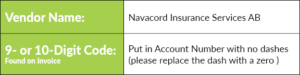
Example:
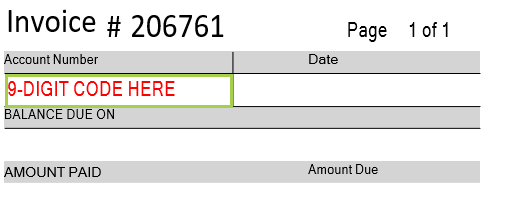
For both the Wire/EFT Transfer and Online bank payments, please send an email to you Account Manager and to ab.payments@navacord.com advising the payment amount and date so that our Finance Depatment can apply the incoming deposit to the correct account.
Option 5
E-Transfer (Auto-Deposit CAD funds only)
To pay via E-Transfer, please follow the instructions below:
- Log into your financial institution’s online or mobile banking and navigate to Interac E-Transfer Send Money.
- Select the account from which you would like to transfer the funds
- Recipient ab.payments@navacord.com
- Type in the amount you sending, along with a message including your Invoice Number and Account Number (found on your invoice). This message is required for the team to be able to apply the payment to your policy.